By JW Tool Box
Regex Tester & Debugger Guide 2026: New Engine Features + Privacy-Safe Testing
What's new in regex engines in 2026, plus a hands-on guide to testing patterns safely in the browser — no uploads, no server-side execution.
Why trust this guide
- Written by JW Tool Box around the actual workflow or linked tool on this page.
- Updated when browser behavior, file handling, or platform dimensions change in ways that affect the steps.
- Focused on practical settings, safe defaults, and real tradeoffs instead of generic filler.
TL;DR — 2026 brought Unicode set notation (
vflag), reliable lookbehind across browsers, and named capture group duplicates. Test all of it without uploading production data in our browser-based Regex Tester.
If you write code for a living, you've stared at something like ^([a-zA-Z0-9_\-\.]+)@([a-zA-Z0-9_\-\.]+)\.([a-zA-Z]{2,5})$ wondering why it won't match an email you know is valid.
Regex is powerful. Debugging it in your head is a nightmare. So you paste the pattern into an online tester and watch the matches light up.
But here's the catch: what if your "dummy text" is actually a chunk of production logs?
The Privacy Problem with Online Regex Testers
When debugging a parsing error, it is incredibly common for developers to copy a chunk of real production logs and paste it straight into an online regex tool. This might include:
- API keys that failed to parse
- Customer JSON payloads
- Server error traces containing internal IPs
- Raw database dumps containing PII (Personally Identifiable Information)
Most online regex testers send your input text and your regex pattern to a backend server (often running Node.js or Python) to evaluate it and send the highlighted HTML back to your screen.
This means you just uploaded sensitive production data to an unknown third-party server.
In 2026, with data sovereignty and security compliance (like GDPR and CCPA) stricter than ever, doing this is a massive liability.
The Localized Web Regex Tester
To bridge the gap between "I need to test this pattern right now" and "I cannot risk uploading this string," you need a tool that evaluates regex entirely within your browser's local sandbox.
This is exactly why I built the JW Tool Box Regex Tester.
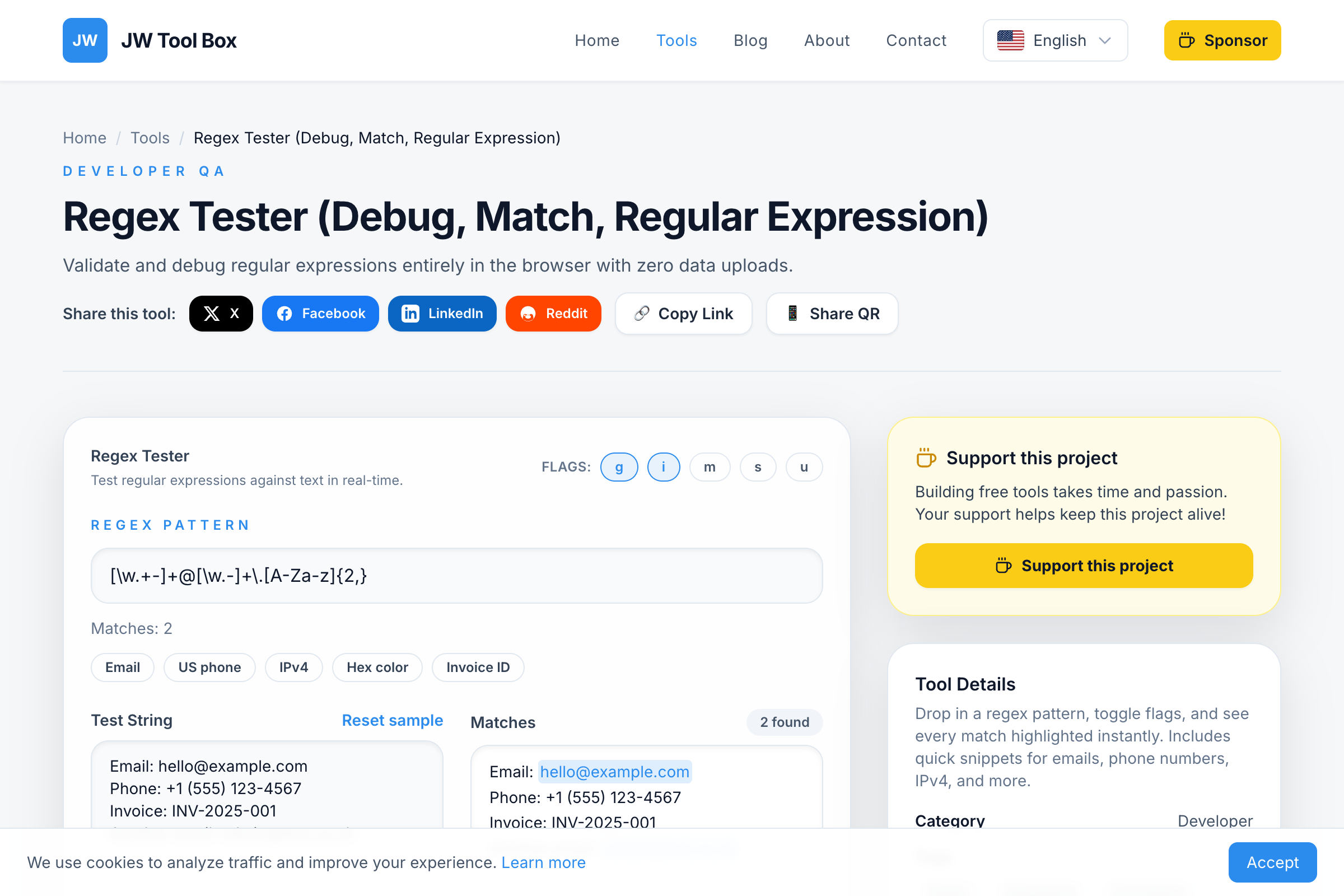
It uses your browser's native JavaScript engine to execute the regular expression. The data literally never leaves your laptop.
Real-Time Validation
When you type into the regex input box, the engine fires immediately. It parses your pattern, evaluates your flags (g for global, i for case-insensitive, m for multiline), and instantly highlights matches in the target text.
Because there is zero network latency (no API roundtrips), the highlighting feels instantaneous, even on massive blocks of text.
Deep Dive into Capture Groups
The most frustrating part of regex isn't just asking "Did it match?" but "Did I extract the right sub-string?"
If you are using capture groups (parentheses ()), the tool breaks down every single match into its constituent groups.
For example, if you tested our email regex against hello@jwtoolbox.com:
- Match 1:
hello@jwtoolbox.com- Group 1:
hello - Group 2:
jwtoolbox - Group 3:
com
- Group 1:
This level of granularity takes the guesswork out of complex parsing logic.
What Changed in Regex Engines in 2026
If you haven't kept up, here's what's actually usable across modern browsers now:
The v Flag (Unicode Set Notation)
The v flag replaces the older u flag and adds set subtraction and intersection inside character classes. This is huge for internationalized validation:
// Match any letter that is NOT an ASCII letter (i.e., only non-Latin scripts)
/[\p{Letter}--[a-zA-Z]]/v
Before v, doing this required ugly workarounds with alternation or lookaheads. Now it's one clean character class. Chrome 112+, Firefox 116+, Safari 17+ all support it.
Lookbehind Is Finally Reliable Everywhere
Variable-length lookbehind ((?<=...)) was a Chrome-only party trick for years. Safari dragged its feet until late 2024. By early 2026, every major engine handles it consistently:
// Match a price amount but only when preceded by a currency symbol
/(?<=[\$€£¥])[\d,]+\.?\d*/g
This is now safe to ship in production without polyfills.
Duplicate Named Capture Groups
ES2025 lets the same group name appear in different alternatives:
/(?<year>\d{4})-(?<month>\d{2})|(?<month>\w+)\s(?<year>\d{4})/v
Each branch defines year and month, and whichever branch matches populates those names. Parsing dates in mixed formats just got way cleaner.
\p{...} Property Coverage
Unicode property escapes keep expanding. Useful additions for 2026 patterns:
| Property | What It Matches | Example |
|---|---|---|
\p{Emoji} |
Any emoji codepoint | /\p{Emoji}+/v |
\p{Script=Han} |
CJK characters | Filter Chinese text |
\p{General_Category=Currency_Symbol} |
$, €, £, ¥ etc. | Currency parsing |
\p{Letter} |
Any letter in any script | Internationalized names |
Test any of these right now in the Regex Tester — it runs on your browser's native JS engine, so you'll see exactly what your target environment supports.
Cheat Sheet: Common Patterns
Quick reference for patterns you need constantly:
Character Classes
| Pattern | Meaning | Example |
|---|---|---|
\d |
Any digit (0-9) | \d{3} → "123" |
\w |
Word char (a-z, A-Z, 0-9, _) | \w+ → "hello_world" |
\s |
Whitespace (space, tab, \n) | \s+ between words |
. |
Any char except newline | a.b → "axb" |
[^abc] |
NOT a, b, or c | [^0-9] → non-digits |
Quantifiers
| Pattern | Meaning |
|---|---|
* |
0 or more (greedy) |
+ |
1 or more (greedy) |
? |
0 or 1 (optional) |
{n} |
Exactly n times |
{n,m} |
Between n and m times |
*?, +? |
Lazy versions (match as few as possible) |
Anchors & Boundaries
| Pattern | Meaning |
|---|---|
^ |
Start of string (or line in multiline) |
$ |
End of string (or line in multiline) |
\b |
Word boundary |
Groups & Lookarounds
| Pattern | Meaning |
|---|---|
(abc) |
Capture group |
(?:abc) |
Non-capturing group |
(?<name>abc) |
Named capture group |
(?=abc) |
Lookahead (followed by abc) |
(?!abc) |
Negative lookahead |
(?<=abc) |
Lookbehind (preceded by abc) |
(?<!abc) |
Negative lookbehind |
Copy-Paste Patterns for Common Tasks
# Email (simplified, covers 99% of real addresses)
^[a-zA-Z0-9._%+-]+@[a-zA-Z0-9.-]+\.[a-zA-Z]{2,}$

# URL with optional protocol
(https?:\/\/)?(www\.)?[\w-]+\.[\w./-]+

# US phone (multiple formats)
\(?\d{3}\)?[-.\s]?\d{3}[-.\s]?\d{4}

# ISO date (YYYY-MM-DD)
\d{4}-(0[1-9]|1[0-2])-(0[1-9]|[12]\d|3[01])

# IPv4 address
\b\d{1,3}\.\d{1,3}\.\d{1,3}\.\d{1,3}\b

# 24-hour time (HH:MM)
([01]\d|2[0-3]):[0-5]\d

# Hex color code
#?([0-9a-fA-F]{3}){1,2}\b
Paste any of these into the Regex Tester, drop in some sample text, and tweak until it does exactly what you need.
FAQ
Why use a browser-based regex tester instead of regex101?
regex101 is great, but it sends your text to a server. If you're testing patterns against production logs, API payloads, or anything containing PII, a local tester keeps that data on your machine.
Do regex flavors differ between browsers?
Yes, slightly. Safari was the last to support lookbehind (late 2024). The v flag is supported in all modern browsers as of 2026, but older targets may still need the u flag. Our tester uses your browser's native RegExp engine, so what works in the tester will work in your shipped JS.
How do I debug a regex that matches too much or too little?
Start with a simpler version of your pattern and build up. Use the capture group breakdown in the tester to see exactly what each () group grabs. Also try the lazy quantifiers (*?, +?) — greedy matching is the most common source of "matching too much."
Related tools:
- Code Formatter — Clean up code before extracting patterns
- JSON Formatter — Pretty-print JSON before running regex on it
About the author
JW Tool Box - Editorial and product review team
JW Tool Box publishes hands-on guides tied directly to the site's browser-based tools. Content is updated when browser behavior, platform rules, or product requirements change in ways that affect real workflows. The goal is to provide practical instructions, tested defaults, and trustworthy reference content instead of thin keyword filler.
Related guides
-
How to Test and Debug Regex Online (Free Regex Tester + Cheat Sheet 2026)
In 2026, most developers don't write regular expressions from scratch—they ask an AI to write them. But there's a massive catch: AIgenerated regex is notorious for confidently hallucinating edge cases that silently fail in production. A single overly greedy quantifier (.) suggested by a chatbot can bring down your entire parsing pipeline or cause catastrophic backtracking. Instead of pasting A…
Related tools
Additional browser-based utilities that are closely related to this workflow.
-
JSON Formatter & Validator (Minify, Beautify, Fix JSON)
Pretty-print, minify, or validate JSON documents instantly.
-
HTML, CSS & JS Formatter (Prettier, Beautify, Minify)
Prettify front-end snippets without installing CLI tools.
-
Regex Tester: Test & Debug Regular Expressions Online
Test regex patterns, see matches highlighted in real time, and debug regular expressions — all in your browser.