By JW Tool Box
Free Receipt Maker: Create Custom Receipts for Small Business (2026)
Create printable receipts instantly with our free receipt maker. Customize with your business logo, add items, calculate totals automatically. Perfect for small business owners.
Why trust this guide
- Written by JW Tool Box around the actual workflow or linked tool on this page.
- Updated when browser behavior, file handling, or platform dimensions change in ways that affect the steps.
- Focused on practical settings, safe defaults, and real tradeoffs instead of generic filler.
Running a small business or freelancing? You need to provide receipts to customers—but buying expensive accounting software feels like overkill when you only need a simple receipt.
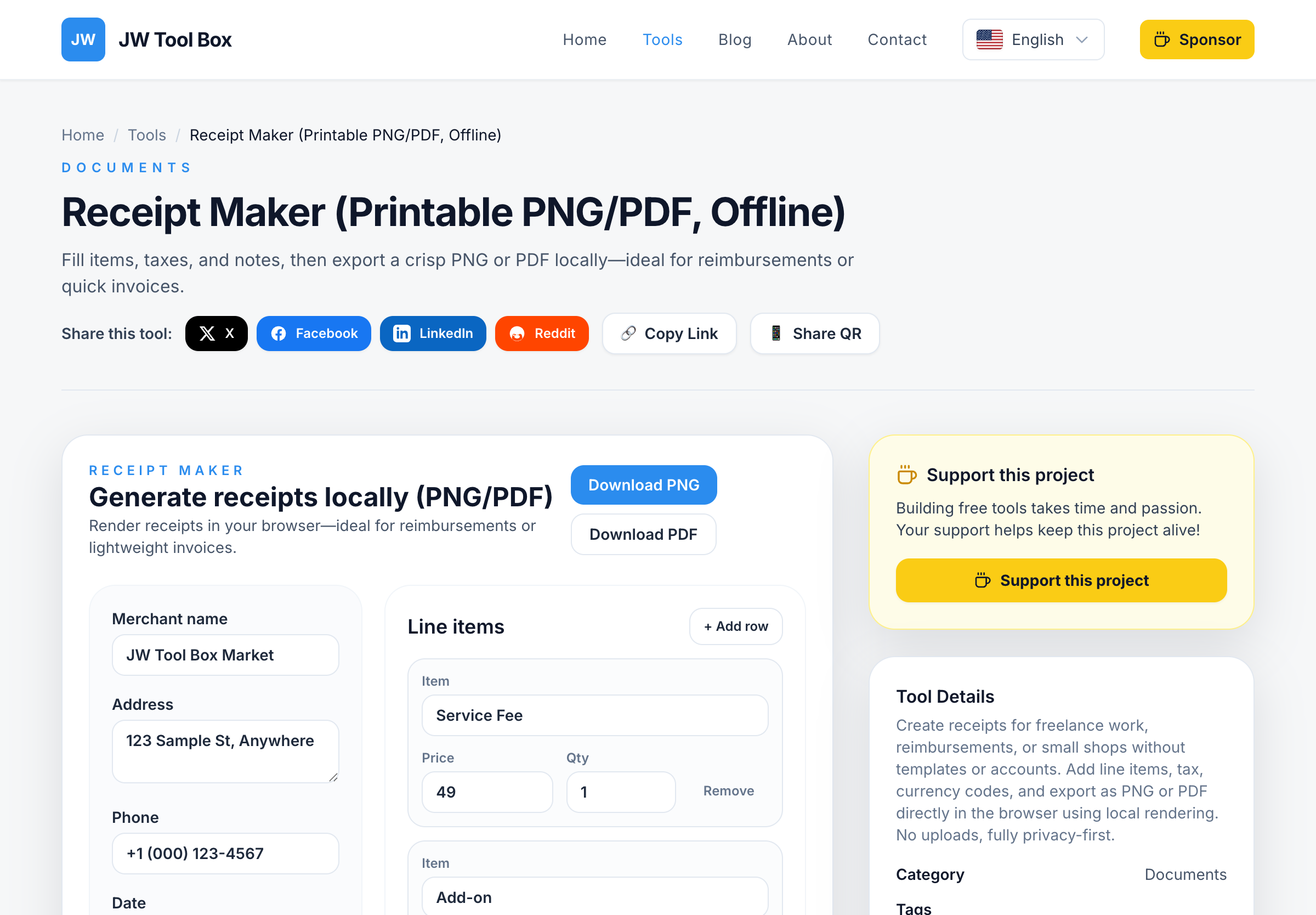
Good news: You don't need QuickBooks or FreshBooks for basic receipts. Use our Receipt Maker to create professional receipts in seconds—completely free, no signup required.
Why Every Small Business Needs Receipts
Receipts aren't just polite—they're essential for:
1. Legal Compliance
Most countries require businesses to provide receipts for:
- Sales over a certain amount (varies by country: $75 in USA, €250 in EU)
- Tax-deductible purchases for your customers
- Warranty claims and product returns
Without receipts, you risk:
- IRS audits (USA) or tax authority investigations
- Customer disputes ("I never received this service!")
- Lost warranty claims for your products
2. Customer Trust
Professional receipts show you're a legitimate business. Customers expect:
- Clear itemization of what they paid for
- Your business contact information
- A unique receipt number for their records
Handwritten receipts on napkins? That's a red flag for customers.
3. Bookkeeping and Taxes
Receipts help you:
- Track monthly revenue
- Identify top-selling products/services
- Calculate accurate sales tax
- Prepare for tax filing (Schedule C for sole proprietors)
Bonus: Many receipt makers (including ours) let you download receipts as PDF, making it easy to organize them in folders like Receipts/2026-01/.
What Makes a Good Receipt?
A legally valid receipt must include:
✅ Business Name and Address – So customers can contact you
✅ Receipt Date and Number – For record-keeping
✅ Itemized List – What was purchased and how much
✅ Subtotal, Tax, and Total – Clear price breakdown
✅ Payment Method – Cash, credit card, PayPal, etc.
Optional but recommended:
- Business logo (builds brand recognition)
- Thank you message ("Thanks for your business!")
- Return policy ("All sales final" or "14-day returns")
How to Create a Receipt in 2 Minutes
Step 1: Visit our Receipt Maker.
Step 2: Fill in your business details:
- Business name: "Jane's Coffee Shop"
- Address: "123 Main St, Austin, TX 78701"
- Phone/Email: "jane@coffeeshop.com"
Step 3: Add customer information (optional):
- Customer name: "John Doe"
- Email: "john@example.com"
Step 4: Add items purchased:
- Item: "Cappuccino" → Quantity: 2 → Price: $4.50 each
- Item: "Blueberry Muffin" → Quantity: 1 → Price: $3.00
Step 5: Click "Calculate" – The tool automatically adds subtotal, tax, and total.
Step 6: Download as PDF or print directly.
That's it. No credit card, no email verification, no hidden fees.
Receipt Maker vs. Accounting Software
| Feature | Our Receipt Maker | QuickBooks | FreshBooks |
|---|---|---|---|
| Price | Free | $30/month | $19/month |
| Setup Time | 0 minutes | 30 minutes | 20 minutes |
| Learning Curve | None | Medium | Medium |
| Suitable For | One-off receipts | Full accounting | Invoicing + receipts |
| Tax Filing | No | Yes | Yes |
When to use our tool:
- You issue fewer than 50 receipts per month
- You don't need payroll or expense tracking
- You want a quick receipt for a garage sale, craft fair, or freelance gig
When to upgrade to software:
- You run a growing business with employees
- You need automatic bank syncing
- You want tax filing integration (USA: Schedule C, 1099s)
Receipt Maker Use Cases
For Freelancers and Consultants
Scenario: You just finished a web design project for a client. They paid $2,500 via PayPal and need a receipt for their records.
Solution:
- Open the Receipt Maker
- Enter your business name: "Sarah Smith Design"
- Add item: "Website Redesign Project" – $2,500
- Add payment method: "PayPal"
- Download PDF and email to client
Time saved: 10 minutes (vs. creating a Word document from scratch).
For Small Retail Shops
Scenario: You run a boutique clothing store. A customer bought a dress ($89) and a scarf ($25) but your POS system is down.
Solution:
- Use the Receipt Maker on your phone or tablet
- Add items and quantities
- Print the receipt using a wireless printer or email it to the customer
Backup plan: Always have a working receipt solution when technology fails.
For Service Businesses
Scenario: You're a dog groomer. A customer paid $60 cash for a grooming session.
Solution:
- Fill in your business details once (save as a template)
- Add the service: "Dog Grooming – Poodle" – $60
- Mark payment method as "Cash"
- Print and hand to customer
Tax tip: Keep a copy for your records to document cash income.
For Craft Fairs and Markets
Scenario: You sell handmade jewelry at a farmers market. Customers pay with Venmo and want receipts.
Solution:
- Pre-fill your business info on the Receipt Maker
- As customers buy, quickly add items and totals
- Show them the receipt on your tablet before emailing it
Pro tip: Use a mobile hotspot if the market has no Wi-Fi.
For Landlords and Property Managers
Scenario: Your tenant paid January rent ($1,200) via check. They need a receipt for tax purposes.
Solution:
- Business name: "ABC Property Management"
- Item: "Rent – January 2026 – Apartment 3B"
- Amount: $1,200
- Payment method: "Check #4521"
- Download as PDF and email
Legal note: In many jurisdictions, landlords must provide rent receipts by law.
Customizing Your Receipts
Adding a Business Logo
A logo makes your receipts look more professional. Here's how:
- Use our Favicon Generator to create a small logo
- Save it as a 200x200px PNG file
- Upload it to the Receipt Maker (if supported) or add it to your PDF template
No logo? Use a text-based design with your initials in a nice font.
Choosing a Receipt Template Style
Our Receipt Maker offers multiple styles:
- Classic – Black text on white, minimal design
- Modern – Clean lines, bold headers
- Colorful – Accent colors matching your brand
Pick the style that matches your business personality.
Adding a Thank You Message
Personal touches build customer loyalty. Try:
- "Thank you for your business!"
- "We appreciate your support."
- "See you next time! – The [Your Business] Team"
Receipt vs. Invoice: What's the Difference?
Many people confuse receipts and invoices. Here's the breakdown:
| Receipt | Invoice |
|---|---|
| Issued after payment | Issued before payment |
| "You paid $100 today" | "You owe $100, due in 30 days" |
| Proof of payment | Request for payment |
| Required for customer records | Required for accounts payable |
Example: A plumber finishes a job and sends an invoice for $300. You pay the invoice. The plumber then sends a receipt confirming the $300 payment.
Use our Receipt Maker for: Documenting completed payments.
Use invoice software for: Requesting payment from clients (try FreshBooks, Wave, or Zoho Invoice).
Tax Considerations for Small Businesses
Sales Tax Calculation
In the USA, most states require you to collect sales tax on goods and some services. Our Receipt Maker:
- Lets you enter a custom tax rate (e.g., 8.25% for Texas)
- Automatically calculates tax on the subtotal
- Shows tax separately on the receipt
Check your state's requirements: Visit your state's Department of Revenue website or consult a CPA.
Deductible Business Expenses
If you're self-employed, keep receipts for:
- Office supplies
- Business meals (usually 50% deductible)
- Travel expenses (mileage, hotels, flights)
- Professional services (accountants, lawyers)
IRS rule: You must keep receipts for expenses over $75. For smaller expenses, a credit card statement is usually enough (but receipts are better).
Record Retention Rules
How long should you keep receipts?
| Country | Retention Period |
|---|---|
| USA | 3-7 years (IRS recommends 7 for safety) |
| UK | 5 years (HMRC) |
| Canada | 6 years (CRA) |
| Australia | 5 years (ATO) |
Digital tip: Scan paper receipts and store them in Google Drive or Dropbox with a backup.
Common Mistakes to Avoid
Mistake 1: Missing Receipt Numbers
Each receipt should have a unique number (e.g., REC-2026-001, REC-2026-002).
Why it matters: During an audit, tax authorities need to verify every transaction. Without numbers, you can't prove the order of receipts.
Fix: Use a numbering system like REC-YYYY-NNN (year + sequential number).
Mistake 2: Not Including Tax Separately
If you charge sales tax, show it as a separate line item.
Wrong:
Item: T-Shirt – $10.83
Total: $10.83
Right:
Item: T-Shirt – $10.00
Tax (8.25%): $0.83
Total: $10.83
Why: Customers need to know how much tax they paid (especially for business expense reimbursement).
Mistake 3: Handwritten Totals with Math Errors
If you write receipts by hand, double-check your math. Mistakes hurt your credibility.
Better solution: Use a calculator or our Receipt Maker (automatic calculations).
Mistake 4: No Copies for Your Records
Always keep a copy of every receipt you issue. Digital copies are best (PDFs, cloud storage).
Reason: If a customer disputes a charge, you need proof they received the receipt.
Mistake 5: Using the Same Receipt Number Twice
Don't reset your receipt numbers to 001 every month. Use a continuous numbering system.
Correct sequence:
- January: REC-2026-001, REC-2026-002, REC-2026-003
- February: REC-2026-004, REC-2026-005, REC-2026-006
Privacy and Security
Do You Store My Receipt Data?
No. Our Receipt Maker works entirely in your browser. Your business details, customer names, and amounts never touch our servers.
How it works:
- You fill in the form in your browser
- JavaScript generates the receipt locally
- You download the PDF directly from your device
Benefit: Even if you're creating receipts for confidential clients, there's no data breach risk.
Can I Use This Offline?
After the first page load, the Receipt Maker works offline (using browser caching). However, to download the latest features, we recommend using it online.
What About GDPR Compliance?
Since we don't collect or store any data, GDPR doesn't apply to our tool. The responsibility for customer data privacy is yours (e.g., don't leave printed receipts in public places).
Alternatives to the Receipt Maker
Mobile Apps:
- Square Register (Free app, but requires Square hardware for processing)
- PayPal Here (Receipt generation included with payment processing)
Downside: These are tied to specific payment platforms.
Microsoft Word/Google Docs Templates:
- Free templates available online
- Requires manual entry and formatting
Downside: Time-consuming, risk of formatting errors.
Paper Receipt Books (Stationery Store):
- Pre-printed carbonless receipt books
- Fill in by hand
Downside: Handwriting is slow, hard to read, and unprofessional-looking.
Our tool wins for: Speed, professionalism, and zero cost.
Frequently Asked Questions
Is the Receipt Maker really free forever?
Yes. There are no hidden fees, no premium upgrades, no subscription plans. We keep it free by displaying ads (you can use an ad blocker if you prefer).
Can I use this for international transactions?
Yes. The Receipt Maker supports multiple currencies (USD, EUR, GBP, CAD, AUD, etc.). Just change the currency symbol before entering amounts.
What if I make a mistake on the receipt?
Simply edit the information in the form and re-download the PDF. Never white-out or cross out amounts on a receipt—that looks suspicious to tax authorities.
Can I add discounts or coupons?
Yes. Add a line item with a negative amount:
- Item: "10% Discount" – Amount: -$5.00
The total will adjust automatically.
Does the tool work on mobile devices?
Yes. The Receipt Maker is fully responsive and works on phones, tablets, and desktops. You can even use it on a Chromebook.
Can I save my business information for future receipts?
The tool uses browser local storage to remember your business details. Next time you visit, your info will be pre-filled (unless you clear your browser cache).
What file formats can I download?
- PDF (best for printing and emailing)
- PNG image (useful for embedding in documents)
Tip: PDF is the standard format for receipts.
Is there a limit to how many receipts I can create?
No limit. Create 1 receipt or 1,000 receipts—completely free.
Can I customize the receipt layout (font, colors, etc.)?
Currently, the tool uses a standard professional layout. If you need custom branding (logo placement, specific fonts), consider using a template in Google Docs or hiring a graphic designer for a one-time custom template.
What if my customer loses the receipt?
You can re-create the receipt using the same information and receipt number. Just mark it as "DUPLICATE" to avoid confusion during audits.
Start Creating Professional Receipts Today
Stop using messy handwritten receipts or paying for expensive accounting software. Use our Receipt Maker to:
✅ Generate professional receipts in seconds
✅ Automatically calculate totals and tax
✅ Download as PDF for easy record-keeping
✅ Work on any device (phone, tablet, desktop)
100% free. No signup. No software installation.
Create your first receipt now: Receipt Maker Tool
Related Tools:
- Tip Calculator – Calculate tips and split bills
- PDF Generator – Convert receipts to PDF format
- Barcode Generator – Add barcodes to receipts for inventory tracking
About the author
JW Tool Box - Editorial and product review team
JW Tool Box publishes hands-on guides tied directly to the site's browser-based tools. Content is updated when browser behavior, platform rules, or product requirements change in ways that affect real workflows. The goal is to provide practical instructions, tested defaults, and trustworthy reference content instead of thin keyword filler.