By JW Tool Box
Free Chinese Pinyin Converter: Learn Pronunciation with Tone Marks (2026)
Master Chinese pronunciation with our free pinyin converter. Transform Hanzi to pinyin with accurate tone marks in seconds. No installation required.
Why trust this guide
- Written by JW Tool Box around the actual workflow or linked tool on this page.
- Updated when browser behavior, file handling, or platform dimensions change in ways that affect the steps.
- Focused on practical settings, safe defaults, and real tradeoffs instead of generic filler.
Learning Chinese? Struggling to pronounce unfamiliar characters? Our Pinyin Converter transforms Chinese text into phonetic pinyin instantly—helping you read, speak, and understand Mandarin faster.
Why Pinyin Matters for Chinese Learners
Pinyin (拼音, literally "spell sound") is the official romanization system for Mandarin Chinese. It's the bridge between Chinese characters and pronunciation.
1. Pronunciation Guide
Chinese characters don't indicate pronunciation. Without pinyin, you can't know that 中国 is pronounced "zhōng guó" (China).
Example:
- Character: 你好
- Pinyin: nǐ hǎo
- Meaning: hello
2. Input Method for Typing
Most Chinese input systems rely on pinyin. When you type "ni3 hao3" on your keyboard, the input method suggests 你好.
Common input methods:
- Google Pinyin Input (Android/Desktop)
- Sogou Pinyin (Most popular in China)
- iOS native keyboard
- Microsoft Pinyin IME (Windows)
3. Dictionary Lookups
Want to find a word in a Chinese-English dictionary? You need pinyin. Dictionaries are organized alphabetically by pinyin spelling.
Example lookup process:
- See unknown character: 树
- Convert to pinyin: shù
- Search dictionary under "S" section
- Find meaning: tree
4. Language Learning Apps
Apps like Duolingo, HelloChinese, and Pleco use pinyin extensively. Understanding pinyin accelerates your learning curve.
How the Pinyin Converter Works
Our tool uses the pinyin-pro library—a comprehensive database of 20,000+ Chinese characters with pronunciation data.
Technical advantages:
- ✅ 100% offline processing (no server uploads)
- ✅ Supports simplified and traditional characters
- ✅ Handles polyphones (characters with multiple pronunciations)
- ✅ Preserves non-Chinese text (English, numbers, punctuation)
- ✅ Instant conversion (no page reloads)
How it works:
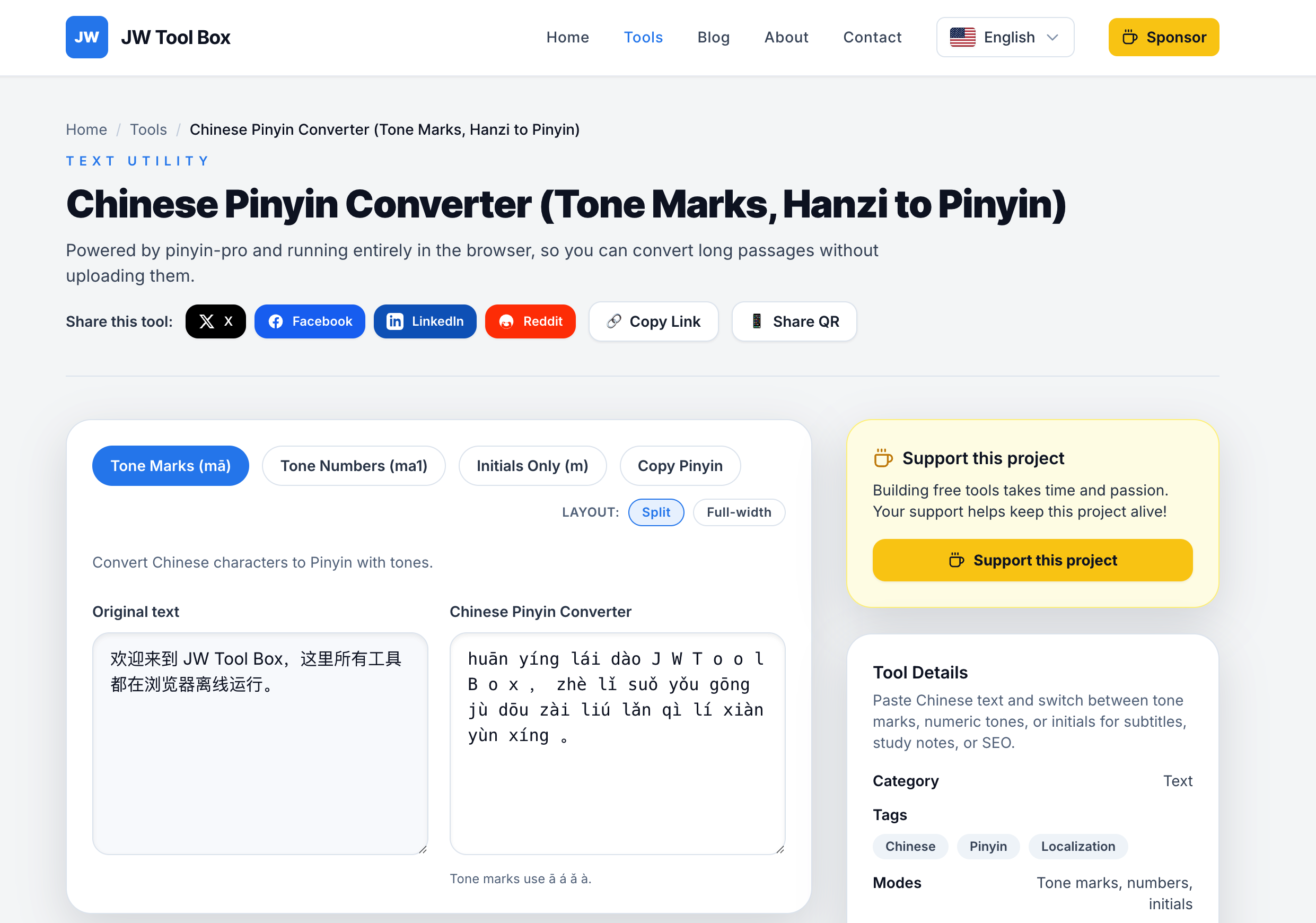
- Paste Chinese text into the input box
- Tool analyzes each character
- Matches character to pinyin database
- Displays pinyin with accurate tone marks
- Copy output to your study notes or app
Three Pinyin Output Formats
Format 1: Tone Marks (Standard)
Example: nǐ hǎo (你好)
When to use:
- ✅ Reading practice
- ✅ Language textbooks
- ✅ Professional documents
- ✅ Most natural for learners
Tone marks explained:
- ā (1st tone): high, flat
- á (2nd tone): rising
- ǎ (3rd tone): falling then rising
- à (4th tone): falling sharply
Format 2: Tone Numbers (ASCII)
Example: ni3 hao3 (你好)
When to use:
- ✅ Text messages (no special characters needed)
- ✅ Typing practice
- ✅ Computer programming
- ✅ Plain text environments
Number meanings:
- 1 = First tone (ā)
- 2 = Second tone (á)
- 3 = Third tone (ǎ)
- 4 = Fourth tone (à)
- 5 = Neutral tone (no mark)
Format 3: Initials Only (Abbreviations)
Example: n h (你好)
When to use:
- ✅ Creating acronyms
- ✅ Quick note-taking
- ✅ Memory shortcuts
- ✅ SMS-style communication in Chinese
Real example:
- 我爱你 (I love you) → w a n → WAN
Pinyin Converter Use Cases
Use Case 1: Chinese Language Student
Profile: Emma, beginner learner (HSK 1-2 level)
Challenge: Reading children's books with unfamiliar characters.
Solution:
- Copy text from Chinese storybook
- Paste into Pinyin Converter
- Select "Tone Marks" format
- Read story aloud using pinyin guide
- Practice pronunciation with teacher
Result: Can read 2x faster with pinyin support.
Use Case 2: Chinese Teacher
Profile: Mr. Liu, teaching Mandarin to English speakers
Challenge: Creating worksheets with pinyin annotations.
Solution:
- Prepare lesson material in Chinese
- Convert to pinyin using the tool
- Copy formatted text into Word document
- Print worksheets for students
- Students practice reading with pinyin
Result: Saves 30 minutes per lesson on manual pinyin entry.
Use Case 3: Translator
Profile: Sarah, English-Chinese translator
Challenge: Verifying pronunciation of proper nouns.
Solution:
- Client sends Chinese name: 王明
- Convert to pinyin: Wáng Míng
- Confirm pronunciation with client over phone
- Use correct tone marks in final document
Result: Accurate pronunciation in official documents.
Use Case 4: Chinese Restaurant Owner (Abroad)
Profile: Chen, restaurant owner in New York
Challenge: Helping English-speaking staff pronounce menu items.
Solution:
- Menu items in Chinese: 麻婆豆腐
- Convert to pinyin: má pó dòu fu
- Print pinyin version on staff training sheet
- Staff can pronounce dishes correctly to customers
Result: Better customer service and fewer pronunciation errors.
Use Case 5: Karaoke Singer
Profile: Lisa, non-Chinese speaker who loves C-pop
Challenge: Learning to sing Chinese songs.
Solution:
- Copy song lyrics from QQ Music
- Convert to tone marks: wǒ ài nǐ (我爱你)
- Practice singing with pinyin guide
- Watch YouTube tutorials for tone practice
Result: Can perform Chinese songs at karaoke night.
Pinyin Tone Rules and Common Mistakes
Tone Mark Placement Rules
Rule: Tone mark goes over the main vowel (a, o, e have priority).
Examples:
- xiǎo (small) - tone mark on 'a' (not 'i' or 'o')
- hǎo (good) - tone mark on 'a' (not 'o')
- jiě (older sister) - tone mark on 'e'
- liú (flow) - tone mark on 'u'
Priority order: a > e > o > i, u (last vowel gets it)
Common Mistake 1: Third Tone Modification
Rule: When two 3rd tones appear together, the first becomes 2nd tone.
Written: nǐ hǎo (你好)
Spoken: ní hǎo (not nǐ hǎo)
Our tool shows written pinyin. For spoken practice, listen to native speakers.
Common Mistake 2: Neutral Tone
Rule: Some syllables lose their tone in natural speech.
Example:
- 妈妈 (mother) = mā ma (not mā mā)
- 爸爸 (father) = bà ba (not bà bà)
The second syllable is neutral (no tone mark or "ma5" in numeric format).
Common Mistake 3: Special Pinyin Spellings
Unique cases:
- ü (as in "lü") uses ü or u after j, q, x
- Example: 绿 = lǜ (green)
- But: 去 = qù (go) - 'u' represents 'ü' sound after 'q'
Our tool handles these automatically.
Pinyin vs. Other Romanization Systems
Pinyin vs. Wade-Giles (Old System)
Wade-Giles was used before 1979. You'll see it in older books and Taiwan.
| Character | Pinyin (Modern) | Wade-Giles (Old) |
|---|---|---|
| 北京 (Beijing) | Běijīng | Pei-ching |
| 台北 (Taipei) | Táiběi | T'ai-pei |
| 毛泽东 (Mao) | Máo Zédōng | Mao Tse-tung |
Why Pinyin won: Official standard since 1982, easier for learners.
Pinyin vs. Zhuyin (Taiwan System)
Zhuyin (注音, aka Bopomofo) uses special symbols, not Latin letters.
| Pinyin | Zhuyin | Character |
|---|---|---|
| nǐ hǎo | ㄋㄧˇ ㄏㄠˇ | 你好 |
| xièxie | ㄒㄧㄝˋ ㄒㄧㄝ˙ | 谢谢 |
Used in: Taiwan schools, Traditional Chinese contexts.
Our tool uses Pinyin (international standard).
Technical Tips for Advanced Users
Tip 1: Batch Processing Long Documents
If you have a 10-page Chinese document:
- Copy entire document into the converter
- Select "Tone Marks" format
- Copy output to a new Word document
- Use Find/Replace to format as needed
Performance: The tool can handle 10,000+ characters instantly.
Tip 2: Creating Dual-Language Subtitles
For Chinese video subtitles with pinyin:
Original subtitle:
我爱学习中文。
With pinyin:
Wǒ ài xuéxí zhōngwén.
我爱学习中文。
Process:
- Export SRT subtitle file
- Paste Chinese lines into converter
- Add pinyin above each Chinese line
- Re-import to subtitle editor
Tip 3: Integrating with Anki Flashcards
Anki is a popular spaced repetition app for language learning.
Card template:
- Front: Chinese character (汉字)
- Back: Pinyin (hànzì) + English (Chinese character)
Workflow:
- List vocabulary words in Chinese
- Batch convert to pinyin
- Import to Anki with CSV format
- Study with flashcards
Tip 4: Pronunciation Practice with Forvo
After converting to pinyin:
- Visit Forvo.com (pronunciation dictionary)
- Search for the Chinese word
- Listen to native speaker recordings
- Compare with your pinyin reading
Example: Search "你好" on Forvo → hear "nǐ hǎo" pronounced correctly.
Comparison with Other Pinyin Tools
vs. Google Translate Pinyin Feature
Google Translate:
- ✅ Free and widely available
- ❌ Requires internet connection
- ❌ No bulk text processing
- ❌ Less accurate for rare characters
Our Tool:
- ✅ Works offline after page load
- ✅ Handles 10,000+ characters at once
- ✅ Multiple output formats (tone marks, numbers, initials)
- ✅ No character limit
vs. Pleco Dictionary App (Mobile)
Pleco:
- ✅ Comprehensive dictionary features
- ✅ Handwriting recognition
- ❌ Paid features ($30-100 for advanced tools)
- ❌ Mobile-only (no desktop version)
Our Tool:
- ✅ 100% free
- ✅ Works on desktop, tablet, mobile
- ✅ No app installation required
- ✅ Open in any browser
vs. Pinyin.info Website
- ✅ Detailed pinyin information and history
- ❌ No interactive converter tool
- ❌ Primarily educational content
Our Tool:
- ✅ Interactive converter with instant results
- ✅ Copy-paste workflow for practical use
- ✅ No navigation between pages
Frequently Asked Questions
Can it convert traditional Chinese characters?
Yes. Both simplified (大陆) and traditional (台灣) characters are supported. The pinyin is the same for both variants.
Example:
- Simplified: 学习 → xuéxí
- Traditional: 學習 → xuéxí (same pronunciation)
How does it handle rare or archaic characters?
The tool uses a database of 20,000+ characters covering HSK 1-6, classical Chinese, and modern usage. Very rare characters (used in ancient texts or specialized fields) might not have pinyin mappings.
Workaround: Look up rare characters individually in tools like Pleco or zdic.net.
What about characters with multiple pronunciations (polyphones)?
Chinese has many characters with context-dependent pronunciations.
Example:
- 行 = xíng (to walk) OR háng (row, line)
- 长 = cháng (long) OR zhǎng (to grow)
How our tool handles it: Uses the most common pronunciation. For context-specific accuracy, manually verify with a dictionary.
Can I convert pinyin back to Chinese characters?
No. Pinyin → Chinese is ambiguous because many characters share the same sound.
Example: "ma" could be:
- 妈 (mother)
- 麻 (hemp)
- 马 (horse)
- 骂 (scold)
- 吗 (question particle)
Solution: Use a Chinese input method that shows character suggestions.
Does it work on mobile phones?
Yes. The tool is fully responsive and works on:
- ✅ iPhone (Safari, Chrome)
- ✅ Android (Chrome, Firefox)
- ✅ iPad/Tablets
- ✅ Desktop browsers
Is my text sent to a server?
No. All conversion happens locally in your browser using JavaScript. Your Chinese text never leaves your device.
Privacy benefit: Safe for confidential documents, student essays, or business translations.
Can I use this for commercial purposes?
Yes, it's 100% free for personal and commercial use. No attribution required (though appreciated).
Example uses:
- Create textbooks with pinyin
- Develop language learning apps
- Annotate Chinese subtitles
- Translate business documents
What's the character limit?
Practical limit: ~50,000 characters (about 100 pages). The tool uses browser memory, so very long texts (novels) might slow down older devices.
Recommendation: For books, process chapter by chapter.
Does it support Cantonese?
No. The tool is designed for Mandarin pinyin. Cantonese uses a different romanization system (Jyutping).
For Cantonese: Try tools like CantoDict or Pleco's Cantonese module.
Start Learning Chinese Pronunciation Today
Stop guessing how to pronounce Chinese characters. Use our Pinyin Converter to:
✅ Convert any Chinese text to pinyin in seconds
✅ Choose tone marks, tone numbers, or initials
✅ Support both simplified and traditional characters
✅ Work offline with complete privacy
100% free. No signup. No installation.
Try it now: Chinese Pinyin Converter Tool
Related Tools:
- Chinese to English Translator – Translate Chinese text
- Word Counter – Count Chinese characters
- Text Case Converter – Format English text
About the author
JW Tool Box - Editorial and product review team
JW Tool Box publishes hands-on guides tied directly to the site's browser-based tools. Content is updated when browser behavior, platform rules, or product requirements change in ways that affect real workflows. The goal is to provide practical instructions, tested defaults, and trustworthy reference content instead of thin keyword filler.
Related tools
Additional browser-based utilities that are closely related to this workflow.
-
Chinese Pinyin Converter (Tone Marks, Hanzi to Pinyin)
Convert Hanzi into tone-mark or tone-number Pinyin instantly.
-
Word Counter (Characters, Reading Time, Analysis)
Count words, characters, and estimate reading time in real-time.
-
Case Converter (Upper, Lower, Camel, Title Case)
Convert text to uppercase, lowercase, Title Case, camelCase, and more.